
OpenAI Launches New SDK for Third-Party Apps Integration in ChatGPT

Introduction to OpenAI’s Apps SDK
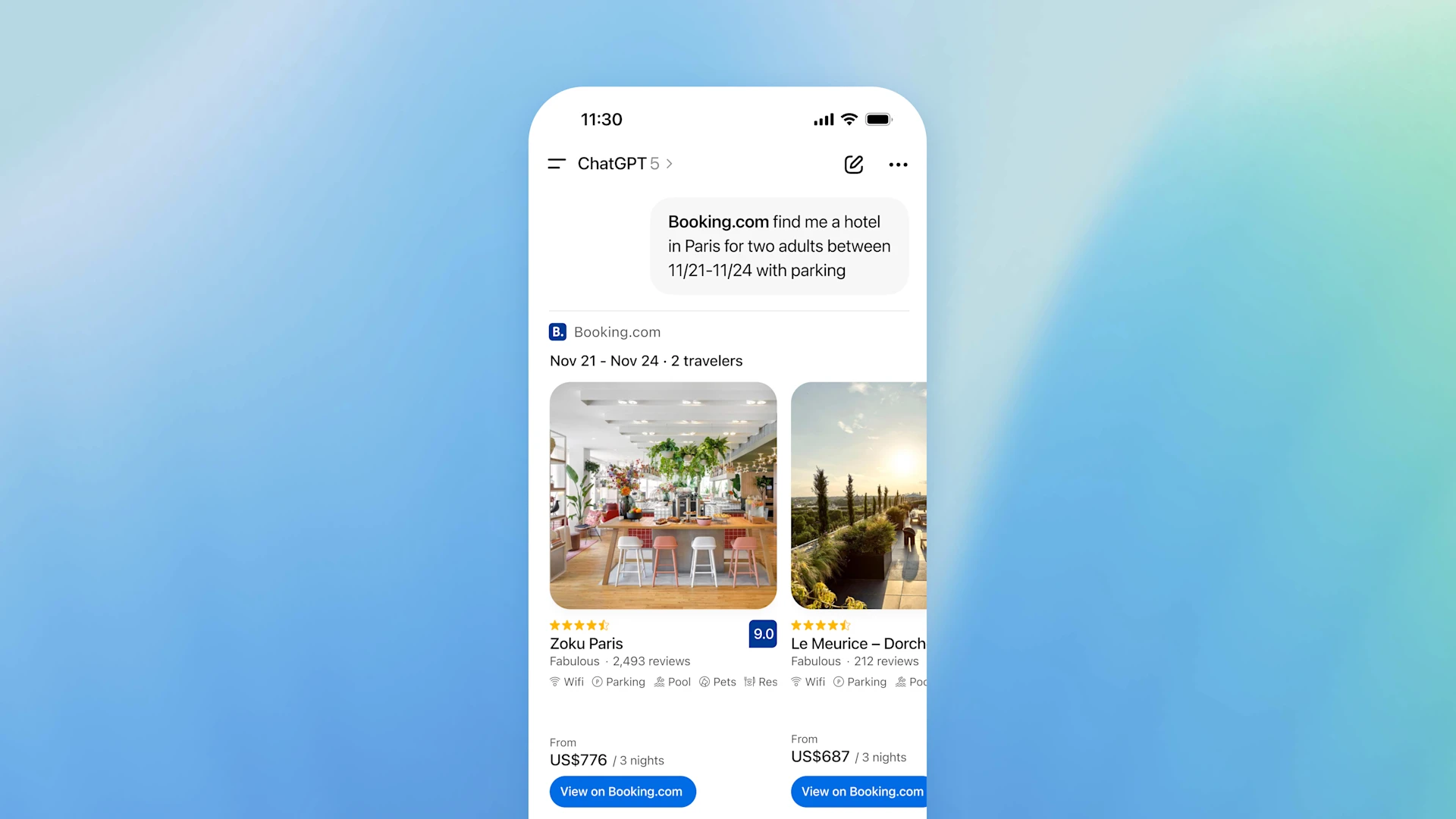
OpenAI has just revealed an exciting new feature at their annual DevDay conference, called the Apps SDK. This allows developers to create apps that can run directly within ChatGPT, paving the way for a more thorough and interactive user experience. This means you won’t have to switch between apps; instead, you can manage everything from within ChatGPT. The introduction of the Apps SDK represents a significant leap forward in the way artificial intelligence can facilitate our everyday tasks, making technology more user-friendly and accessible.
what’s the Apps SDK?

The Apps SDK enables third-party developers to build applications that can smoothly integrate with ChatGPT, allowing users to log into their accounts, access their information, and perform various tasks. This expands ChatGPT’s functionality, providing users with the ability to interact with multiple services without leaving the platform. By bridging the gap between different applications, the SDK enhances the overall productivity and convenience for users, turning ChatGPT into a central hub for various digital interactions.
How Does It Work?
With the Apps SDK, users can ask ChatGPT to execute specific actions within various applications. For instance, you could prompt it to create a presentation in Canva based on a description you provide or inquire about home listings from Zillow tailored to your preferences. This integration allows for highly personalized and efficient interactions. The ease with which users can navigate between tasks and platforms is expected to save time and enhance productivity, making ChatGPT an indispensable tool for both personal and professional use.
Features and Benefits
The Apps SDK offers several key features that enhance user experience:
- Inline App Access: Apps appear as lightweight cards within the chat interface, ensuring that conversations remain smooth and engaging.
- Fullscreen Mode: For tasks requiring more immersion, users can expand apps to a full-screen view, which is perfect for maps or presentations.
- Picture-in-Picture Support: This feature lets users engage with live content, like videos or quizzes, while still chatting with ChatGPT.
Real-Time Interaction
One of the most groundbreaking attributes of the Apps SDK is its capability for real-time interaction. Users can request information from one app while viewing content from another, all within the same conversation. For example, you could ask about a video lesson on Coursera while simultaneously navigating through the content. This not only streamlines the user experience but also allows for more dynamic and engaging conversations, turning ChatGPT into a virtual assistant that can cater to diverse needs simultaneously.
Early Integrations
During the event, OpenAI showcased some initial integrations with popular platforms, including:
- Coursera: Users can request lessons and receive video content directly in the chat.
- Canva: Helps the creation of designs based on user prompts.
- Zillow: Users can browse property listings in real-time.
Other partners, such as Booking.com, Expedia, and Spotify, are also set to join the platform, enhancing the range of services available. As the number of integrations grows, users can expect a more versatile and reliable tool that adapts to their needs and preferences, ultimately providing a richer digital experience.
Looking Ahead: Future Integrations
While the Apps SDK is available in preview mode now, OpenAI has plans to include more applications as the year progresses. they’re already in talks with potential partners across various industries, including travel, lifestyle, and e-commerce, to provide even wider capabilities. The potential for collaboration with more industry leaders hints at a future where ChatGPT can handle an even broader array of tasks, becoming a truly multifunctional platform that evolves with user demands.
Example Scenarios
Imagine wanting to expand a small business. You could ask ChatGPT which city would be ideal for expansion based on previous conversations. It could suggest a location, then prompt Zillow to display properties available in that area—all without leaving the ChatGPT interface. This simple integration demonstrates how the Apps SDK can facilitate more informed decision-making, allowing users to take advantage of various data points and insights in real-time for better outcomes.

Safety and Privacy Considerations
OpenAI is committed to maintaining high standards for privacy and safety within the Apps SDK. Each app must meet specific criteria:
- Serve a clear and valuable purpose.
- Provide predictable and reliable performance.
- Be suitable for a general audience, including teens.
- Respect user privacy and limit unnecessary data collection.
What’s more, developers must ensure their applications include a clear privacy policy and obtain user consent before accessing any data. This commitment to user safety is vital in building trust and ensuring that users feel secure while using the platform, especially as it handles more sensitive information across different applications.
Getting Started with the Apps SDK
The Apps SDK is currently being rolled out to ChatGPT users in various tiers, including Free, Plus, Go, and Pro, with a broader release planned later in the year. As a user, you’ll soon be able to experience these integrations firsthand, making your interactions with ChatGPT richer and more efficient. The anticipation surrounding these developments reflects a growing interest in how AI can enhance our digital experiences, encouraging users to explore new ways of engaging with technology.
Conclusion
OpenAI’s introduction of the Apps SDK marks a significant shift in how users can interact with ChatGPT. By integrating third-party applications directly into the chat interface, it’s making it easier for users to access services and information in one place. As more apps become available, we can expect to see an evolution in user experience that prioritizes interactivity and personalization. The future looks promising for the Apps SDK, potentially reshaping the scene of digital communication and productivity.
FAQs
what’s the Apps SDK?
The Apps SDK allows developers to create applications that run directly within ChatGPT, enhancing user interactions without needing to leave the platform.
Which apps are currently available with the Apps SDK?
Current integrations include Coursera, Canva, and Zillow, with plans to add more apps like Booking.com and Spotify in the future.
How will the Apps SDK improve my experience with ChatGPT?
The SDK enhances your experience by allowing you to interact with multiple apps and services without switching between platforms, making tasks more efficient. This ultimately transforms ChatGPT into a versatile tool that can assist you in numerous ways, catering to both your personal and professional needs.
What are the privacy measures in place for the Apps SDK?
Apps must comply with strict privacy and safety standards, including a clear privacy policy and user consent before accessing any data. These measures are designed to protect users and ensure that their interactions remain confidential and secure.
When can I start using the Apps SDK?
The Apps SDK is currently in preview and is rolling out to selected users, with broader access expected later this year. This gradual rollout allows OpenAI to refine the experience based on user feedback and ensure that the SDK meets the needs of its diverse audience.
You Might Also Like


